
Populating a data warehouse or data lake with source data is typically the first major step toward making the analytics environment useful for end users and downstream services. How well this step is executed determines both the cost and timeline of the overall warehouse build — and how quickly individual data services can be delivered.
In this post, we share our hands-on experience designing batch data ingestion pipelines for analytical platforms, explain when batch is the right choice versus a streaming approach, and walk through how years of solving these problems crystallized into Alphyn Data Replicator — a production-grade batch replication tool that ships as part of the Alphyn Lakehouse platform.
Batch or Real-Time — Which Should You Choose?
After years of designing data integration solutions, we've settled on a firm principle: if batch replication is feasible, choose it. Don't chase minimal lag unless the business genuinely requires it. Real-time replication should only be used when the cost and service-level trade-offs clearly justify it.
Treat user requirements with healthy skepticism. Ask directly and you'll almost always hear: "Of course we want everything loaded into the warehouse in real time." In practice, that's usually wishful thinking. There are rarely concrete reports, processes, or SLAs that actually demand up-to-the-second data. And when such processes do exist, they typically involve a small number of objects — requirements can be scoped accordingly.
When batch integration makes sense:
The acceptable lag from the source is greater than 15 minutes.
The source system can export data in batch mode without degrading its own performance — either from the primary database at any time, within a dedicated maintenance window, or from a read-only standby replica.
The extraction speed per iteration stays within the acceptable lag window.
Data must be ingested not only from databases but also from flat files or via FTP.
Bulk loading is required — entire schemas or databases without manual per-object configuration — for example, during an initial load or for regular full-schema copies.
Basic data quality checks (duplicates, null values in keys) need to run as part of the load process.
A mode is required that other tools don't support, or the scenario involves heterogeneous replication such as S3<->HDFS, Greenplum<->HDFS, or HDFS<->HDFS.
Reasons to avoid batch replication and prefer real-time loading with a change data capture approach:
The required lag from the source is under 15 minutes.
The source system cannot deliver data in batch mode within the required SLA — due to performance constraints, critical workloads that batch extraction would impact, or the absence of a read replica.
The source database lacks effective bulk export mechanisms (including file-based export).
Incremental extraction is needed but there is no way to identify a logical increment.
The source performs unlogged physical row deletions.
The source is supported by a Change Data Capture (CDC) tool and direct access to change logs is available — with CDC producing no additional load on the source database.
Data transformations are needed in-flight — such as online enrichment or conditional lookups.
Data must be delivered to sinks that don't support batch imports.
Keep in mind that the target system may have its own constraints. Some sinks are intolerant of online changes or even simple online inserts, which may require combining both approaches with different tools. Even when real-time replication is chosen, an initial batch load is usually necessary, and periodic corrective batch runs are often needed to reconcile drift. This is the lambda architecture pattern: data flows in real time, but a batch rewrite covers a fixed window at regular intervals. Batch rewrites also serve as a data quality correction mechanism.
With the theory out of the way, let's get into the main topic: Alphyn Data Replicator, the batch replication tool built into Alphyn Lakehouse. This material is relevant not only for those evaluating the tool, but also for anyone who has built — or is planning to build — their own batch loading solution.
A Brief History
The first time we tackled bulk, reliable, heterogeneous replication from multiple databases into a single target without off-the-shelf ETL tooling was about ten years ago. The requirements were:
Structure synchronization with type mapping and no data quality loss.
Full schema migration.
Incremental mode operation.
The intended target was Vertica. The pilot prototype worked well, but the project never launched — the client dropped Vertica from their target architecture and shifted priorities. The idea sat on the shelf for a couple of years until data lake projects started appearing on the Hadoop ecosystem. That's when we finally had the chance to put everything into practice at serious scale. Some of the solutions built during those projects still move terabytes of data every day.
In the years since, nothing suitable appeared among open-source projects or commercial products. Airbyte came along and became available on-premises, but it was oriented toward Western cloud markets. Other tools didn't fit the typical requirements and realities of our clients. Meanwhile, the market saw a wave of "import substitution" products that were little more than repackaged open source with minimal functional changes — or none at all.
That's what led us to finally build a proper production-grade solution: one that could eventually become a functional component of the Alphyn Lakehouse product line. Alphyn Data Replicator is not a fork or adaptation of any open-source project. It was designed and built from scratch, grounded in the requirements described above and in solutions validated through years of project work.
Build vs. Buy
This is a genuine dilemma for any platform owner or prospective customer: is it worth building a custom data loading solution in-house, or is a ready-made tool the better path — assuming it meets all technical and functional requirements?
The primary consideration should be development time. Even a simple implementation without incremental mode, metadata change tracking, or data quality checks requires a skilled team and a significant time investment. A useful reference point is the effort involved in internal tooling projects — the kind documented in post-mortems where teams reflect on how many people and how many months it took to get something working reliably.
Alphyn Data Replicator, as a ready-made tool, lets you start replicating data into the warehouse as soon as the infrastructure is in place. The moment your lakehouse environment exists, data becomes available to analysts and services. You can always build your own bespoke solution — one that accounts for every nuance of your specific source systems — later, once the platform is live. The choice is yours.
What Alphyn Data Replicator Can Do
Working in a Big Data environment typically means following the ELT (Extract, Load, Transform) paradigm — process data where it lives. In practice, this means the replication tool handling the Extract and Load steps should do exactly that and nothing more: pull data from the source and deliver it to the target. That is the essential baseline of functionality.
Alphyn Data Replicator supports the following extraction modes:
Full extraction — Snapshot mode.
Logical increment selection:
Increment extraction using any scalar deterministic function.
Time window extraction with both lower and upper bounds.
Partition range capture from partitioned sources, including automatic range or partition list detection.
Data extraction based on custom filter conditions.
For each extraction iteration, the tool generates queries based on the last successful session for that object. Alphyn Data Replicator also supports Pre-SQL and Post-SQL hooks — useful when data needs to be prepared before extraction and cleaned up afterward.
Extraction can run in multi-threaded mode, where multiple sessions are opened against the source simultaneously, each reading its own data range. Range boundaries and session counts are determined automatically. Alphyn Data Replicator first samples the source to estimate total volume, then calculates the number of sessions given the available resources of the processing engine (Spark, PXF, or another integration tool) — splitting data into evenly distributed intervals if resources are constrained. It also enforces a maximum session count to avoid overwhelming the source system. For distributed sources, requests can be load-balanced across nodes using round-robin. Per-source availability windows can be configured as well.
In a typical landscape, dozens or even hundreds of objects are loaded simultaneously. Alphyn Data Replicator has a built-in scheduler that forms job queues based on priorities configured by the administrator across sources and systems — because source-side extraction capacity is finite and the number of objects and data volumes can greatly exceed it.
How Data Is Applied in the Target
Alphyn Data Replicator was designed not merely as a data delivery mechanism but as a tool for rapidly building a primary storage layer — an Operational Data Store (ODS). Data delivery to the target layer is handled according to the selected scenario.
Available scenarios:
Simple insert — append-only.
SCD Type 1 (SCD1) — new rows are inserted, changed rows are updated.
SCD1 with physical delete handling — within the captured data range, Alphyn Data Replicator compares source and target, identifies deleted rows, and either removes them from the target or marks them with a logical deletion flag, depending on configuration.
SCD4 history preservation — for each source table, two tables are created in the target:
An SCD1 table reflecting the current state of the source.
A HIST satellite table storing the full change history.
SCD4 mode is particularly valuable when the source system doesn't retain change history or periodically purges it. Maintaining history is essential for retrospective analysis and for reconstructing historical states in analytical layers and data marts.
The extraction and apply phases can run synchronously or asynchronously — the latter is useful when multiple extraction sessions should be consolidated into a single apply session.
Architecture
Alphyn Data Replicator is fundamentally a framework-style tool. Rather than moving data itself, it uses internal metadata to generate executable code for all systems participating in the data exchange, then dispatches that code to other frameworks, databases, and processing engines for execution. The tool's job is to orchestrate the code generation and monitor task execution. Under this architectural model, the tool itself requires very few system resources — the heavy lifting is done by the engines it coordinates. A few examples make this concrete.
Example 1: Loading from a relational database into Greenplum
Data extraction from the source can be performed via the PXF framework or via Spark.
PXF or Spark extract the data and deliver it to Greenplum, where it is applied to the target table according to the selected scenario. Alphyn Data Replicator generates the executable code for both extraction and apply using Greenplum's SQL dialect with the appropriate parameters, and manages execution.
After the apply phase, a vacuum operation is triggered if needed and statistics are collected.
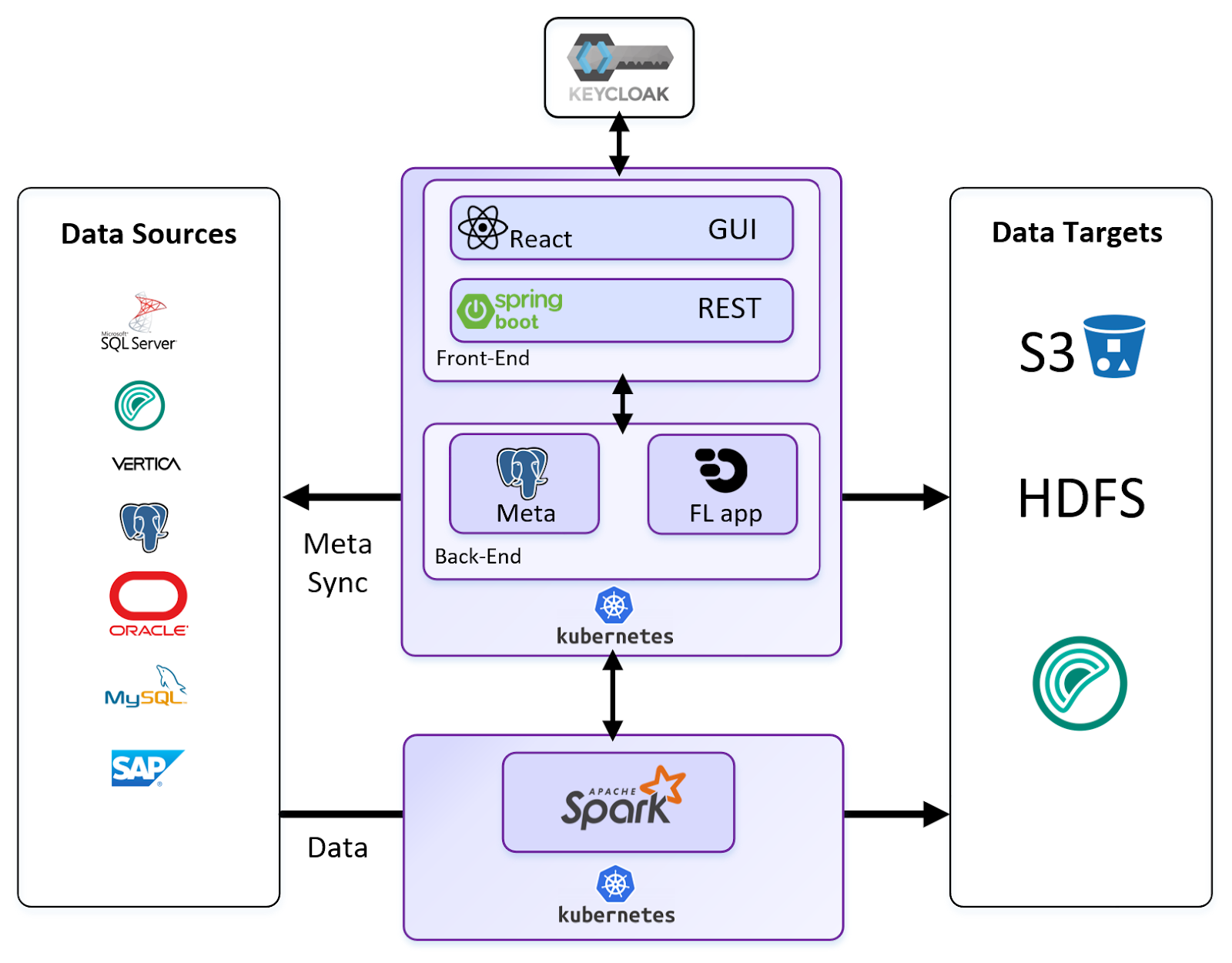
Spark, used here as the transport layer between source and target, can run in standalone mode, on a YARN Hadoop cluster, or in a Kubernetes environment — for example, when populating the Alphyn Lakehouse platform.
Example 2: Loading from Teradata into a Lakehouse (S3 object storage)
Data extraction is performed via Teradata Parallel Transporter (TPT). Alphyn Data Replicator generates TPT jobs, manages their execution, and controls writes to S3.
Once data is written to object storage, Alphyn Data Replicator applies it according to the selected update scenario using one of the supported lakehouse engines — Spark or Impala. It generates the appropriate Spark or Impala SQL code and manages execution.
After the apply phase, statistics are collected on the target objects.
When writing to HDFS or S3, in addition to traditional file formats, Apache Iceberg table format is supported.
Alphyn Data Replicator itself runs in a Kubernetes containerized environment, making it a cloud-ready application. PostgreSQL is used as its internal metadata store.
Supported Sources
The following connectors ship with the tool:
Oracle
MS SQL Server
Postgres
SAP IQ
SAP ASE
MySQL
SAP HANA
Teradata
Greenplum
MariaDB
sFTP
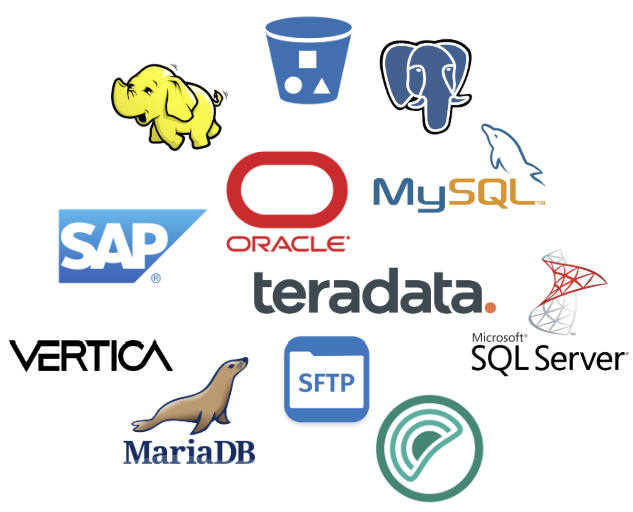
In most cases, adding a new connector for a relational or MPP database requires minimal effort: write queries against the source data dictionary per the tool's requirements, add type mapping, and select the right driver. If extraction from a new source can't be handled through a standard interface, a code generation module for an external framework will need to be added.
Cross-Cluster Replication
Cross-cluster replication serves two purposes: fast data movement between role-specific clusters within the same system, and building a fault-tolerant disaster recovery leg — especially when the DR cluster is in a separate data center. The target cluster remains continuously available for reads and queries even as changes are being applied.
Between object stores or Hadoop systems, data is exchanged at the file level with metastore metadata invalidation. Incremental updates are supported, and small files on the source cluster are repackaged to the target file size during transfer. When using Apache Iceberg, the Iceberg snapshot is invalidated on the target side.
For Hadoop systems that don't use Iceberg but require ACID guarantees, Alphyn Data Replicator includes an isolation service based on HDFS snapshot switching. This guarantees transactional continuity and change isolation on the receiving side.
Supported replication directions:
Greenplum <-> S3
Greenplum <-> HDFS
HDFS <-> S3
S3 <-> S3
HDFS <-> HDFS
Greenplum <-> Greenplum
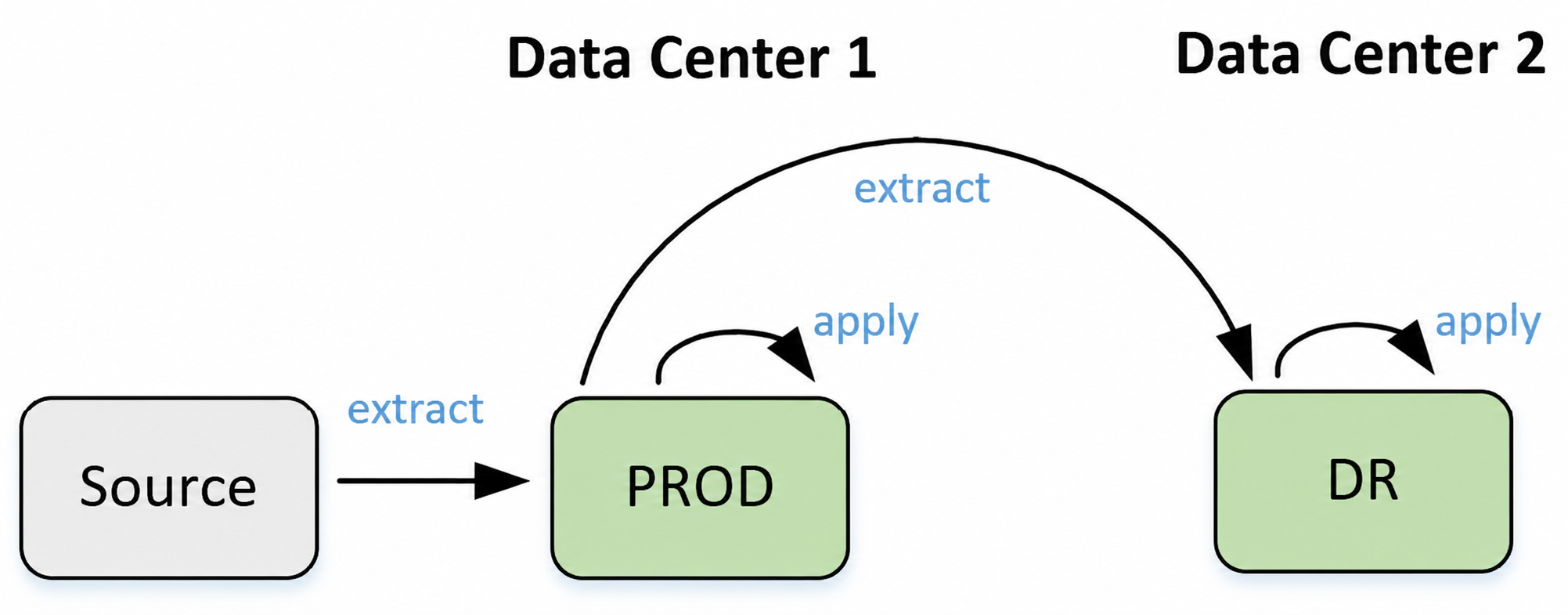
Cross-cluster replication supports two operational modes. The first guarantees delivery from the source system to two or more independent clusters simultaneously. Data is extracted from the source, written to both target clusters, and applied to both according to the selected scenario once the write completes. This approach guarantees a consistent, committed state of primary source data on both clusters in the event of a failover from production to standby. The source system is queried exactly once.
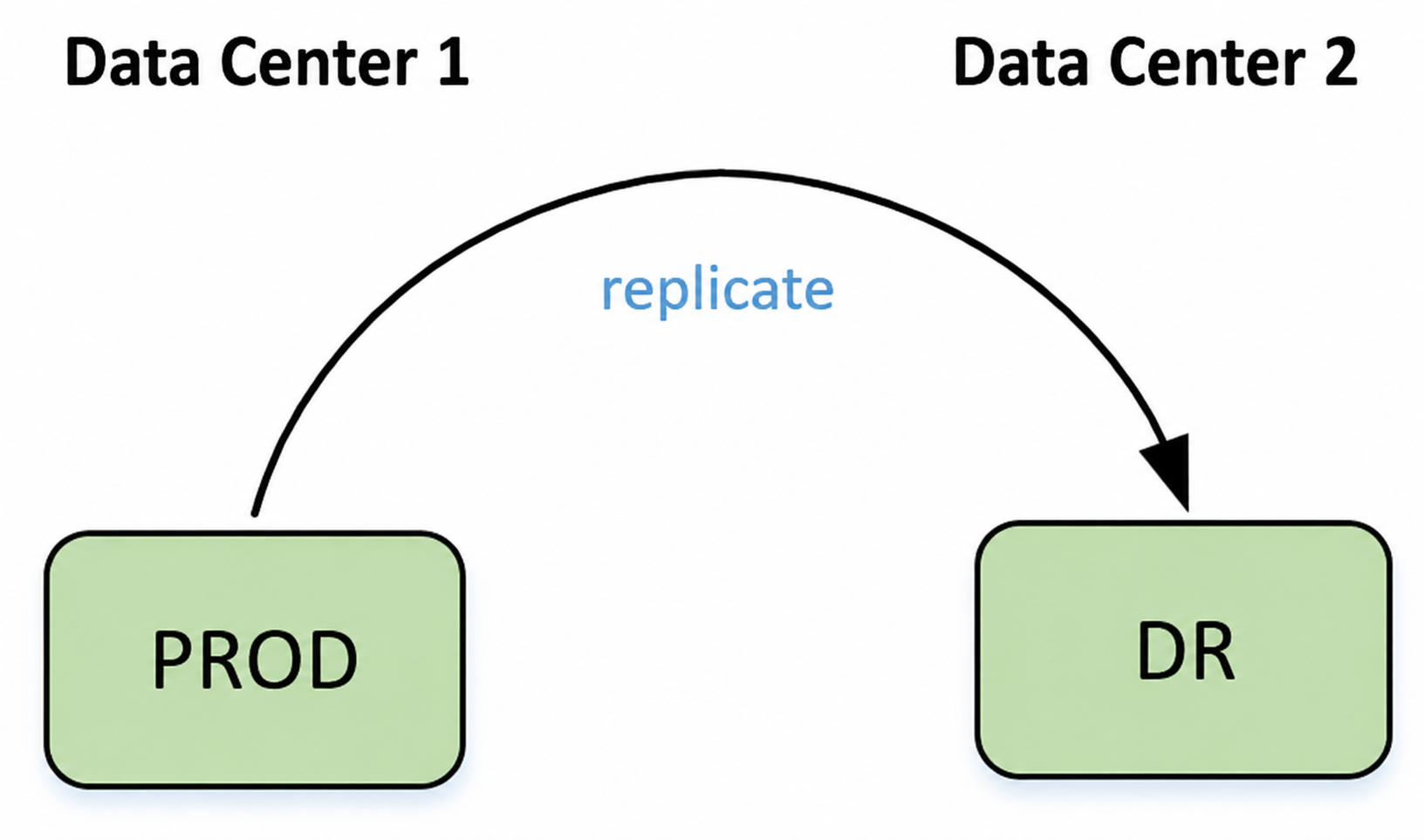
The second mode handles replication of derived data between clusters — either on a schedule or triggered via API call. In practice, this works as follows: an ETL tool updates a data mart and then calls the Alphyn Data Replicator API to copy changes from the target object to the standby cluster.
Together, these two cross-cluster replication modes implement the Double ETL high-availability principle out of the box:
The source system is queried exactly once.
Data is written to both clusters simultaneously.
Derived data (analytical layers, data marts) is computed on the production system.
Changes to derived data are synchronized to the standby cluster.
The standby cluster remains in sync with production for both primary and derived data.
Lag is bounded only by the network bandwidth between data centers.
When roles are swapped between production and DR, Alphyn Data Replicator can reverse the replication direction accordingly.
Data Quality Controls
All internal processes that produce derived data within the warehouse — as well as any user-facing workloads — need to operate on data they can trust. Enforcing data quality checks at ingest time is the most effective way to establish that trust. Alphyn Data Replicator includes the following built-in checks:
Row count reconciliation between source and target. This is especially important when using logical increment mode with sources that may receive late-arriving rows. In that case, Alphyn Data Replicator can automatically re-capture the affected data range from the source to account for stragglers.
Primary key uniqueness. Not all target systems enforce uniqueness constraints or allow primary keys to be defined at the sink level. When the source itself lacks a unique key, a deduplication mode is available on the target side.
Mandatory field validation. Null values are checked across all fields designated as required.
Schema mutation detection. The tool checks whether the DDL of the source and target have diverged. Depending on the type of change and the tool's configuration, one of three outcomes is triggered:
Changes are propagated from source to target.
Changes are ignored with a log notification.
The load process is halted, requiring a deliberate administrative decision before resuming.
Integration Capabilities
Building the initial raw data layer (Raw or ODS) is typically just the first step in the processing and transformation pipeline — one that feeds many downstream processes linked by dependencies. Most warehouse landscapes include an orchestrator that manages the execution order of every step from source extraction to materialization in the final layer or export to a consuming system. Alphyn Data Replicator provides two documented integration interfaces for connecting with external orchestrators and schedulers: a procedural native API and a REST API.
Common integration patterns include:
Triggering a data mart or detail layer computation. When a calculation requires several up-to-date tables, the orchestrator uses the API to tell Alphyn Data Replicator to refresh those tables before proceeding.
Event-driven orchestration via API. The orchestrator creates a ticket in Alphyn Data Replicator — effectively a "go fetch and update these N tables" instruction. Once Alphyn Data Replicator confirms completion, the orchestrator fires the next step in the processing chain.
User Interface
Alphyn Data Replicator ships with an intuitive graphical interface. The core design goal was to make data load configuration accessible to business users first — then to help administrators create, configure, schedule, launch, and maintain replication processes. A GUI reduces the skill level required to operate the system day-to-day.
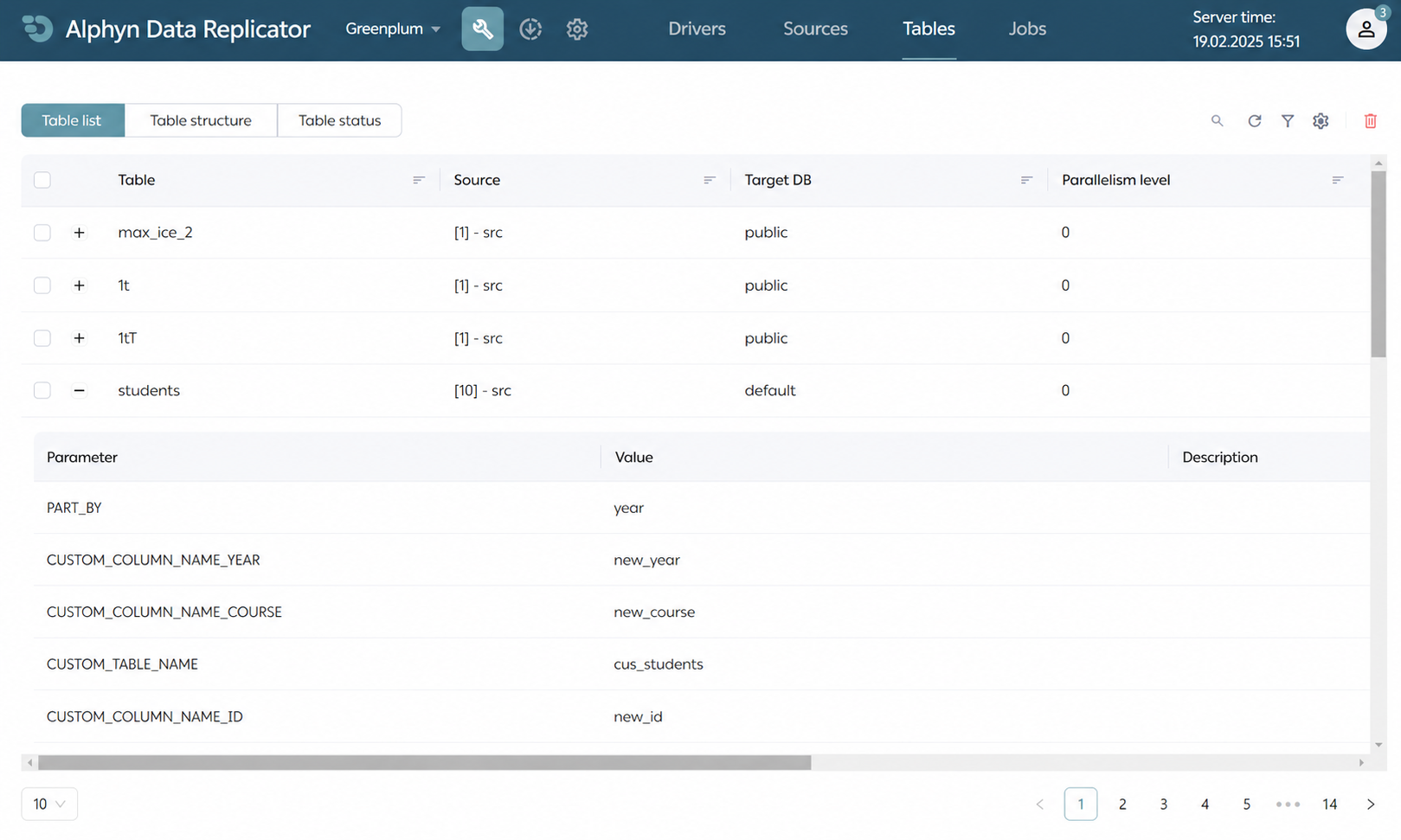
All GUI interaction with the backend goes through the REST API, so the choice of interface is always left to the user: REST services, the GUI, the native API, the command line — or all of the above, depending on the situation.
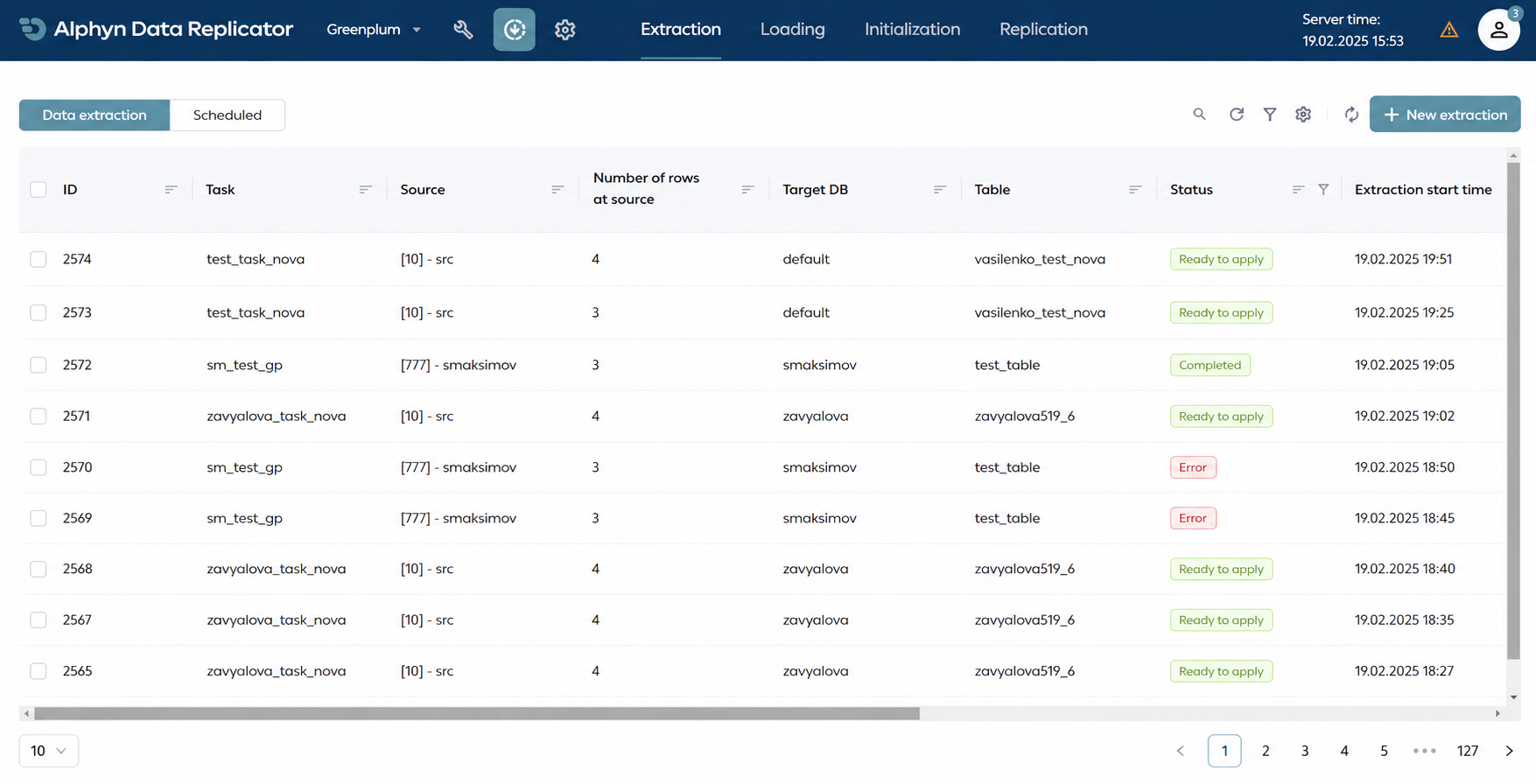
The interface implements role-based access control.
Roadmap
Alphyn Data Replicator has an active development roadmap shaped by user feedback and market trends. Currently in development is an export module for pushing derived data from the warehouse to consuming systems. The list of supported sources continues to expand — Kafka support is coming soon.
We are broadening the set of target Big Data engines responsible for applying data according to the selected scenario. During 2025, we plan to add StarRocks — which is already part of the Alphyn Lakehouse platform — and tailor efficient apply scenarios specifically for it. New source capture modes are planned to offer more flexibility and reduce extraction load. We also plan to support installable extensions on the source side to standardize communication between the tool and sources through a unified instrumentation API.
We are currently improving Teradata integration using the Native Object Store feature. The product team is testing multi-apply replication, where data extracted from a source once can be applied to multiple heterogeneous targets simultaneously — for example, extracting from Oracle and delivering the data to Hadoop, Greenplum, and an S3 lakehouse in a single operation.
In 2025, the graphical interface will gain multi-tenancy support, enabling users to switch between multiple Alphyn Data Replicator instances from a single UI when more than one installation is in use.
***
Alphyn Data Replicator and the Alphyn Lakehouse platform are developed by Alphyn.AI.
See it on your own data
If you're weighing how this would handle your workloads, we'd be glad to walk you through Alphyn Lakehouse on a real scenario. Book a sovereign-lakehouse walkthrough →
About Alphyn.AI
We build the Alphyn Lakehouse, a Kubernetes-native, high-performance, multi-engine lakehouse for any enterprise data and analytical workload — from agentic AI and BI to structured and unstructured data. Built entirely on open standards and an open architecture, Alphyn Lakehouse is a sovereign, on-premises solution for regulated enterprises across the GCC and the wider MENA region.