The Alphyn.AI Team is pleased to announce the general availability of a procedural SQL extension for the MPP engines inside Alphyn Lakehouse. In this post we walk through its capabilities, use cases, and practical examples.
Motivation
One of the most common reasons organisations rule out a Lakehouse when choosing a new analytical platform is the absence of procedural SQL. The prospect of abandoning years — sometimes decades — of enterprise-grade stored procedures written for Oracle, SQL Server, or Postgres/Greenplum is genuinely daunting. All that accumulated expertise would be wiped out overnight, forcing teams to rebuild every data pipeline from scratch using tools such as Airflow and dbt.
Honestly, we think that approach has merit: platform-agnostic orchestration and transformation tools are the right long-term bet. If you have to migrate again in a few years, you'll be in a far better position. But the reality is that rewriting an entire pipeline framework takes significant time, resources, and expertise in an unfamiliar technical domain. And even after a full migration to an Airflow/dbt stack, some capabilities that procedural extensions provide remain genuinely hard to replicate — most notably, returning a result dataset directly to the calling client as the output of a procedure call.
Consider a common enterprise pattern where the data warehouse serves dozens or even hundreds of downstream services, each following roughly the same contract:
The client calls a procedure, passing a set of session variables;
Inside the procedure, executable SQL is generated based on those input variables;
The SQL performs DML operations — selecting and computing data, creating temporary objects, updating persistent database objects;
A result-set SELECT or CURSOR over a persistent object is returned to the calling client.
This is exactly the situation our users faced — made harder by the fact that the owners of the consuming services were either unable or unwilling to change their side of the contract.
Spark 4 did introduce procedural SQL, and it is part of the Alphyn Lakehouse platform. But Spark is not optimised for BI-style interactive access with sub-second response times. That left us with one logical path: build a procedural extension for the MPP SQL engines in the platform — Impala and StarRocks.
Capabilities of the Alphyn Lakehouse Procedure SQL (LPSQL) Extension
* Feature information is current as of the publication date.
The first release of the procedural extension includes the following functionality:
Saving stored procedures to the system metastore for later invocation;
Parameterised procedure calls (input parameters);
Variable support: declaration, assignment, and assignment from SQL query results;
Dynamic SQL via the
EXECUTEconstruct;Numeric
FOR LOOPandWHILE ENDloops;Explicit and implicit cursor support;
Returning scalar variables from a procedure to the calling client;
Returning a full dataset via
SELECTfrom a procedure to the calling client;Built-in metastore helper functions for use in dynamic query generation;
Conditional operators;
Exception handling.
Usage Examples
Let's see what this looks like in practice with a series of examples that illustrate the key capabilities.
CREATE PROCEDURE demo_proc(IN X INT)
--PRC Example 1
--Declare vars
DECLARE row_nums INT;
BEGIN

	--Set up session parameters
	EXECUTE IMMEDIATE 'set mem_limit = 100m';
	EXECUTE IMMEDIATE 'set mt_dop = 2';

	--ReCreate temporary table
	DROP TABLE IF EXISTS default.temp_table;
	CREATE TABLE default.temp_table (
		product_id_int BIGINT,
		product_id_char STRING,
  		name STRING
	);
	--Create loop with counter
	FOR i IN 1..X LOOP
		--lets do some data transformation and multiply rows according to the counter
		INSERT INTO default.temp_table
		SELECT * FROM default.product;
	END LOOP;

	--Lets count total number of multiplied rows and put it into the variable
	SELECT COUNT(*) INTO row_nums FROM default.temp_table;

	--Return total number of rows from the procedure
	SELECT row_nums as Result;
END;
To validate and save a procedure, use the LPSQL command with the procedure body enclosed in double quotes:
LPSQL "procedure text";
To call a saved procedure, use the CALL command:
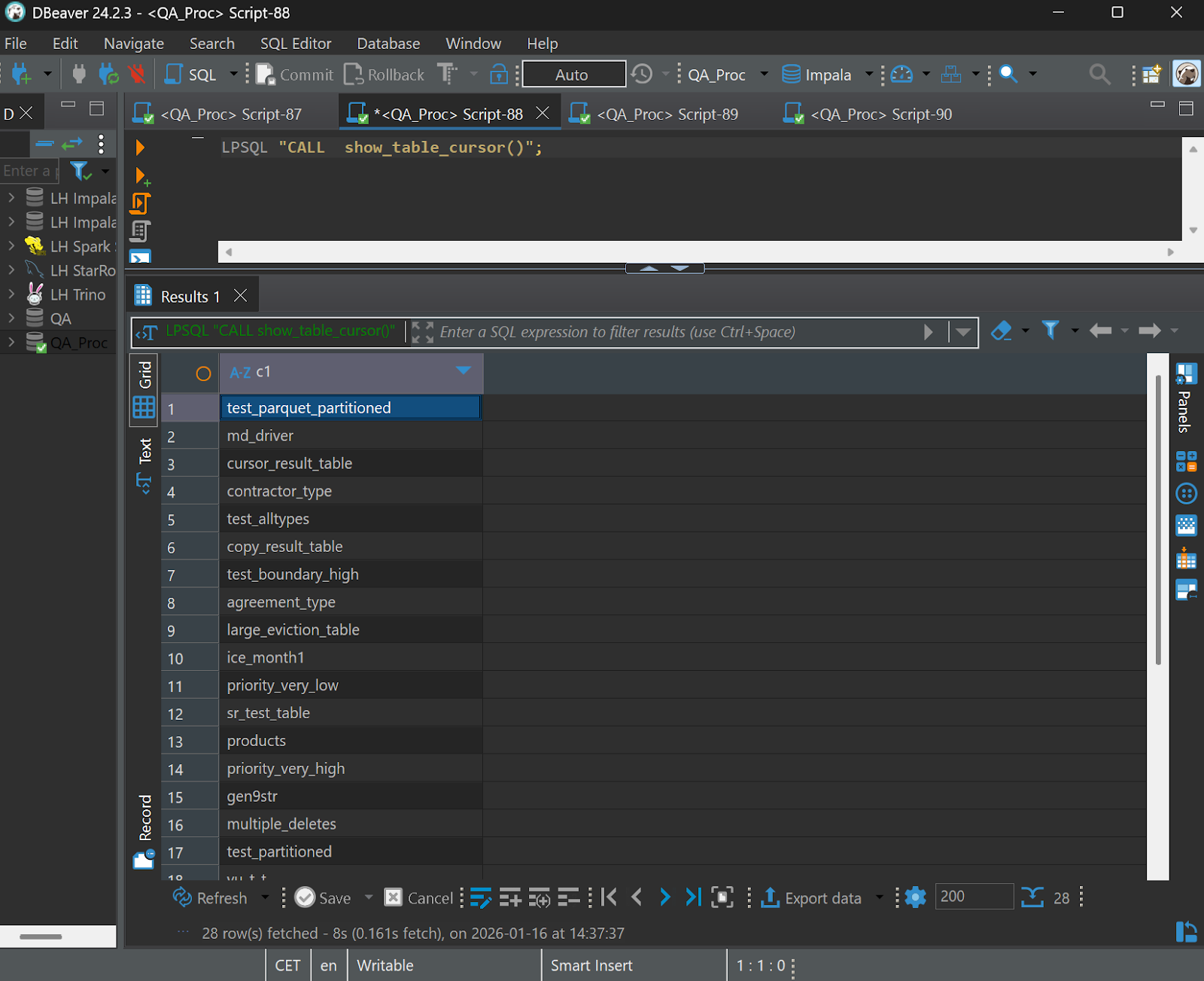
LPSQL "CALL demo_proc(3);"The next example lists all tables in a database. It replaces the integer auto-increment loop with a cursor-based loop, and returns the result dataset from a SELECT statement back to the calling client.
CREATE PROCEDURE show_table_cursor()

--Example: dynamic SQL query with a FOR LOOP
--Iterate over the list of tables in a schema and write results to a table

BEGIN

 DECLARE c1 CURSOR;

	--ReCreate temp table
 	DROP TABLE IF EXISTS default.cursor_result_table;
 	CREATE TABLE default.cursor_result_table
	(
   TABLE_NAME STRING
 	) STORED AS PARQUET;

 -- Cursor over results of SHOW TABLES IN default
 FOR c1 IN ('SHOW TABLES IN default') LOOP
   -- c.name is the table name from SHOW TABLES output
   EXECUTE IMMEDIATE
     'INSERT INTO default.cursor_result_table VALUES(\"'  c1.name  '\")';

 END LOOP;
 -- Return results

 SELECT * FROM default.cursor_result_table order by 1;
END;
Result verification:
Now let's implement an example with nested loops, fetching cursor rows into session variables, and using those variables in dynamic SQL.
--  Example: nested cursor implementation

CREATE PROCEDURE create_runtime_dict()

BEGIN
 DECLARE name STRING;
 DECLARE Column STRING;
 DECLARE Column_Type STRING;
 DECLARE rn INT;

  --Create/recreate results table
 EXECUTE IMMEDIATE 'DROP TABLE IF EXISTS default.cursor_result_table';
 EXECUTE IMMEDIATE 'CREATE TABLE default.cursor_result_table
 (
   TABLE_NAME STRING,
   COLUMN_NAME STRING,
	COLUMN_TYPE STRING,
	DIST_ROWS INT
 ) STORED AS PARQUET';

 -- Declare cursor via query string
 DECLARE c1 CURSOR FOR  'SHOW TABLES IN default';
 OPEN c1;
 LOOP
   FETCH c1 INTO name;
   IF SQLCODE <> 0 THEN LEAVE;
	END IF; -- Exit when data is exhausted

   -- Nested cursor (dynamic)
   BEGIN
     DECLARE c2 CURSOR FOR  'SHOW COLUMN STATS default.' || name;

     OPEN c2;

     LOOP
       FETCH c2 INTO Column, Column_Type, rn;
       IF SQLCODE <> 0 THEN LEAVE; END IF;
       EXECUTE IMMEDIATE 'INSERT INTO default.cursor_result_table VALUES ('''  name  ''', '''  Column  ''', '''  Column_Type  ''', '|| rn ||')';
     END LOOP;

     CLOSE c2;

   END;

 END LOOP;
CLOSE c1;
END;

END;
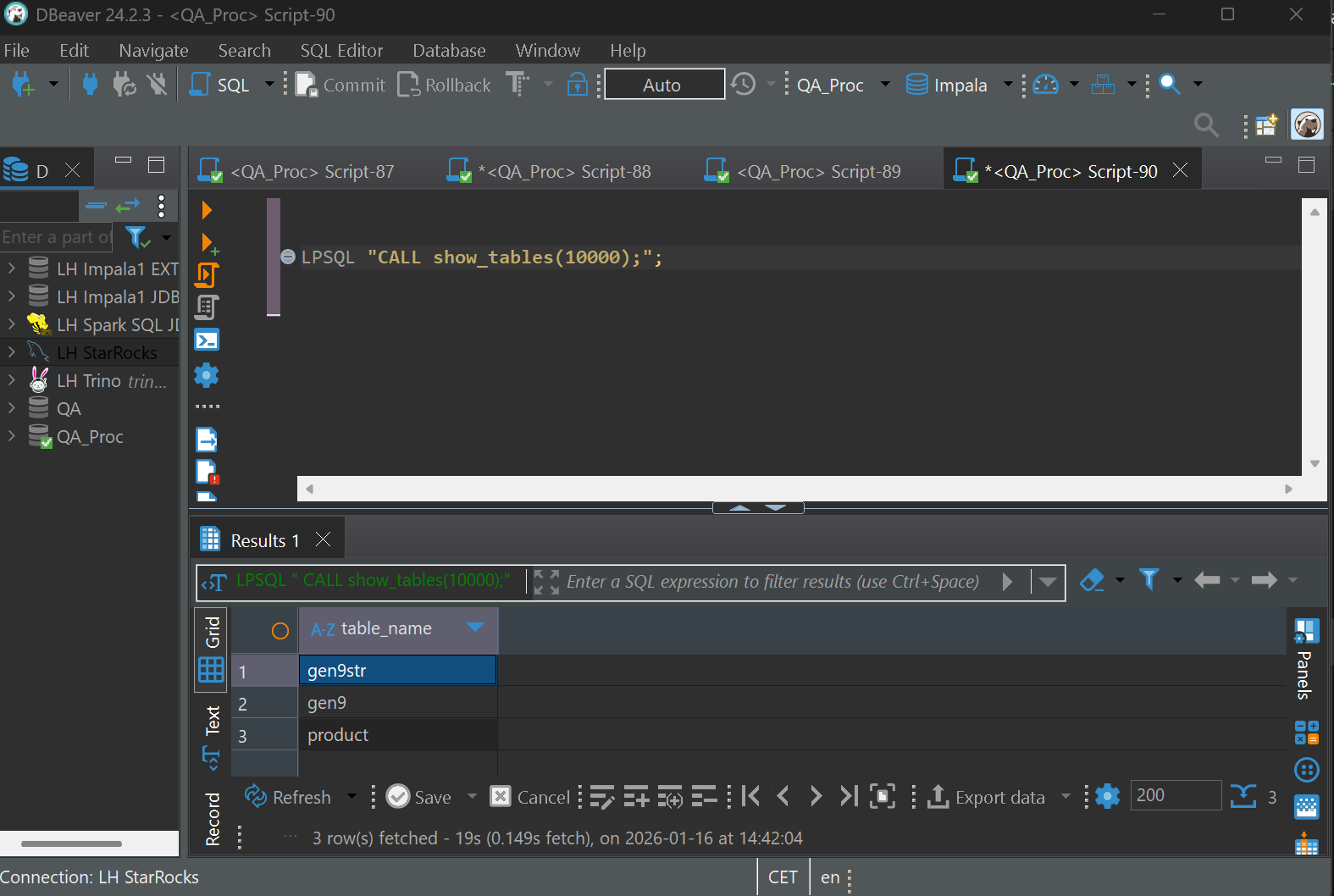
Let's add another procedure that calls the one above and returns the list of tables in the database whose distinct row count in any column exceeds a given input parameter.
CREATE PROCEDURE show_tables(n INT)
--Example: nested procedure call

BEGIN

	--Drop view
	EXECUTE  'DROP VIEW IF EXISTS default.V_show_table';

	--Create session temp dictionary
	CALL runtime_dict();

	--Lets get list of tables with more than n distinct rows of any column

	EXECUTE  'CREATE VIEW default.V_show_table AS SELECT DISTINCT table_name FROM default.cursor_result_table WHERE dist_rows >' || n;

SELECT * FROM  default.V_show_table;

END;
Here are the results, querying for tables with more than 10,000 distinct values in any column:
Enough abstract examples. Let's tackle one of the most common warehouse workloads: a simple loader implementing Slow Changing Dimensions Type 1 in procedural code.
CREATE or replace PROCEDURE scd1_load(schema_nm string, tabname string, PK string)

--schema_nm - target table schema
--tabname - target table name
--PK - primary key column(s); comma-separated for composite keys

BEGIN

	DECLARE Column STRING
	DECLARE UPD_FLDS string; --Column list for UPDATE
	DECLARE INS_FLDS string; --Column list for INSERT
	DECLARE PK_FLDS string; --Primary key equality expression
	DECLARE EQ_FLDS string; --Business column comparison list
	DECLARE MERGE_SQL string; --MERGE script for loading the target table

	DECLARE buf = '';
	PK_FLDS = '1=1';

	counter = 1;

	tar_tab = schema_nm||'.'||tabname;
	int_tab = schema_nm||'.INT_'||tabname;

	LOOP --Build the primary key equality expression

		select SPLIT_PART(PK, ',',counter) into buf;
		IF buf = '' THEN LEAVE; END IF;
		PK_FLDS = PK_FLDS  ' AND old.'buf||' = new.'||buf;
		counter = counter+1;

	END LOOP;

	--Technical (audit) fields
	DECLARE task_id_fld = 'tech_task_id'; --Current load identifier
	DECLARE del_fld = 'tech_deleted_flg'; --Soft-delete flag
	DECLARE chng_dttm_fld = 'tech_changed_dttm'; --Record change timestamp
	DECLARE c1 CURSOR FOR  'SHOW COLUMN STATS '|| tar_tab;

   OPEN c1;

	LOOP
		FETCH c1 INTO Column, Column_Type, rn;
		IF SQLCODE <> 0 THEN LEAVE; END IF;
		IF Column != task_id_fld and Column != del_fld and Column != chng_dttm_fld
		THEN
			INS_FLDS = INS_FLDS  '\tnew.'Column||', \n';
			UPD_FLDS = UPD_FLDS  '\told.'Column||' = new.'||Column||',\n';
			EQ_FLDS = EQ_FLDS    '\told.'Column||' != new.'||Column||' OR ';
		END IF;
	END LOOP;

	MERGE_SQL = '
		MERGE INTO '||tar_tab||' as old
		using '||int_tab||' as new
		on '||PK_FLDS||'
		WHEN MATCHED AND new.'||del_fld||' !=1 AND ('||EQ_FLDS||' 1 = 0)
		THEN UPDATE SET
		'||UPD_FLDS||'\told.'||task_id_fld||' = CAST(UNIX_TIMESTAMP() AS INT),
		\told.'||del_fld||' = 0,
		\told.'||chng_dttm_fld||' = CURRENT_TIMESTAMP()
		WHEN MATCHED AND new.'||del_fld||' = 1 AND old.'||del_fld||' = 0
		THEN UPDATE SET
			old.'||task_id_fld||' = CAST(UNIX_TIMESTAMP() AS INT),
			old.'||del_fld||' = 1,
			old.'||chng_dttm_fld||' = CURRENT_TIMESTAMP()
		WHEN NOT MATCHED BY SOURCE AND old.'||del_fld||' = 0
		THEN UPDATE SET
			old.'||del_fld||' = 1,
			old.'||chng_dttm_fld||' = CURRENT_TIMESTAMP(),
			old.'||task_id_fld||' = CAST(UNIX_TIMESTAMP() AS INT)
		WHEN NOT MATCHED AND new.'||del_fld||' != 1
		THEN INSERT VALUES (
		'||INS_FLDS||'CURRENT_TIMESTAMP(),
		CAST(UNIX_TIMESTAMP() AS INT),
			new.'||del_fld||'
		)
		';

	execute MERGE_SQL;

END;
Example call:
LPSQL "CALL scd1_load('DDS', 'ACCOUNT_TAB', 'id, fld1');";Here is one more practical example — a routine that collects table statistics across a schema. The procedure takes two parameters: whether to force a statistics refresh or only collect stats for tables that have none, and whether to run a full or incremental computation. Incidentally, Alphyn Lakehouse includes built-in incremental statistics collection for Iceberg tables, which significantly reduces the time and compute resources required.
CREATE or REPLACE PROCEDURE stats_missing_proc(cur_schema string, proc_mode int, inc_mode int )

--cur_schema - schema to check
--proc_mode  - 0 = force collection for all tables | 1 = collect only for tables without statistics
--inc_mode   - 1 = incremental statistics | 0 = full statistics

BEGIN

	DECLARE name string;
	DECLARE clmn string;
	DECLARE tp string;
	DECLARE dv int;
	DECLARE nlls int;

	-- Tracking table
  	create table if not exists default.tech_compactor_proc
	(
		tabname string,
		got_stats int
	)
	stored as parquet;

	-- Audit log table
	create table if not exists default.tech_compactor_logs
	(
		tabname string,
		query string,
		dttm timestamp
	)
	stored as parquet;

	truncate table default.tech_compactor_proc;
	truncate table default.tech_compactor_logs;

	--	Open cursor to iterate over all objects in the schema
	DECLARE c1 CURSOR FOR  'SHOW TABLES IN '||cur_schema;
	OPEN c1;
	  LOOP
	    FETCH c1 INTO name;
	    IF SQLCODE <> 0 THEN LEAVE;
		END IF; -- Exit when data is exhausted

		--	Open nested cursor to get statistics for each object
		DECLARE c2 CURSOR FOR 'show column stats '||cur_schema||'.'||name;
		OPEN  c2;
			LOOP
				FETCH c2 INTO clmn, tp, dv, nlls;
				IF SQLCODE <> 0 THEN LEAVE;
				END IF;
				IF (dv < 0 AND proc_mode = 1) OR (proc_mode = 0) THEN
					EXECUTE IMMEDIATE 'INSERT INTO default.tech_compactor_proc SELECT ''' name ''', '||dv||'';
				END IF;
			END LOOP;

		END LOOP;

		-- Exception handler in case the schema contains views
		EXCEPTION WHEN OTHERS THEN
		END;

	-- Collect full statistics
	IF inc_mode = 0 THEN
		DECLARE c1 CURSOR FOR 'select distinct tabname from default.tech_compactor_proc'

		OPEN c1;
		LOOP
			FETCH c1 INTO name;
		    IF SQLCODE <> 0 THEN LEAVE;
			END IF; -- Exit when done
			EXECUTE IMMEDIATE 'COMPUTE STATS '||cur_schema||'.'||name;
			EXECUTE IMMEDIATE 'INSERT INTO default.tech_compactor_logs(tabname, query, dttm) SELECT '''||cur_schema||'.'||name||''', ''COMPUTE STATS '||cur_schema||'.'||name||''', now()';
		END LOOP;

	END IF;

	-- Collect incremental statistics
	IF inc_mode = 1 THEN
		DECLARE c1 CURSOR FOR 'select distinct tabname from default.tech_compactor_proc'
		OPEN c1;
		LOOP
			FETCH c1 INTO name;
		    IF SQLCODE <> 0 THEN LEAVE;
			END IF; -- Exit when done

			EXECUTE IMMEDIATE 'COMPUTE INCREMENTAL STATS '||cur_schema||'.'||name;
			EXECUTE IMMEDIATE 'INSERT INTO default.tech_compactor_logs(tabname, query, dttm) SELECT '''||cur_schema||'.'||name||''', ''COMPUTE INCREMENTAL STATS '||cur_schema||'.'||name||''', now()';

		END LOOP;
	END IF;

END;
Conclusion
As these examples show, the procedural extension opens up a wide space for building custom in-platform solutions with a low barrier to entry — especially for teams bringing existing skills from traditional database systems. The entry cost is minimal: if you can write a stored procedure in Oracle or SQL Server, you can write one in LPSQL.
The next production release of Alphyn Lakehouse will add procedural SQL support for the StarRocks engine. Our goal is to let users choose their execution engine without having to rewrite procedure code, as long as the SQL statements inside are portable. We also plan to extend compatibility with the T-SQL and PL/SQL dialects, expose the metastore API for direct data-dictionary access from within procedures, add an equivalent of Oracle's ALL_SOURCES view, and introduce informational message output to an execution log.
In parallel, we are researching and building a query transpiler from Postgres and Greenplum dialects to the MPP engines in Alphyn Lakehouse. The objective is not merely to ease migration, but to make migration unnecessary: client applications would require no changes and would continue to believe they are sending queries to and receiving responses from Greenplum or Postgres.
See it on your own data
If you're weighing how this would handle your workloads, we'd be glad to walk you through Alphyn Lakehouse on a real scenario. Book a sovereign-lakehouse walkthrough →
About Alphyn.AI
We build the Alphyn Lakehouse, a Kubernetes-native, high-performance, multi-engine lakehouse for any enterprise data and analytical workload — from agentic AI and BI to structured and unstructured data. Built entirely on open standards and an open architecture, Alphyn Lakehouse is a sovereign, on-premises solution for regulated enterprises across the GCC and the wider MENA region.